
Step by step in the Instagram app
How to export your data
Follow the steps below. Takes less than 5 minutes.
Quick setup — 2 screens
Configure the export correctly on these two screens
1
Step 1 of 7
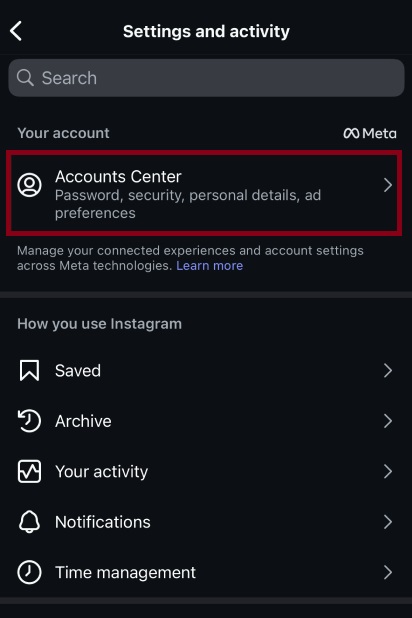
Access the Accounts Center
2
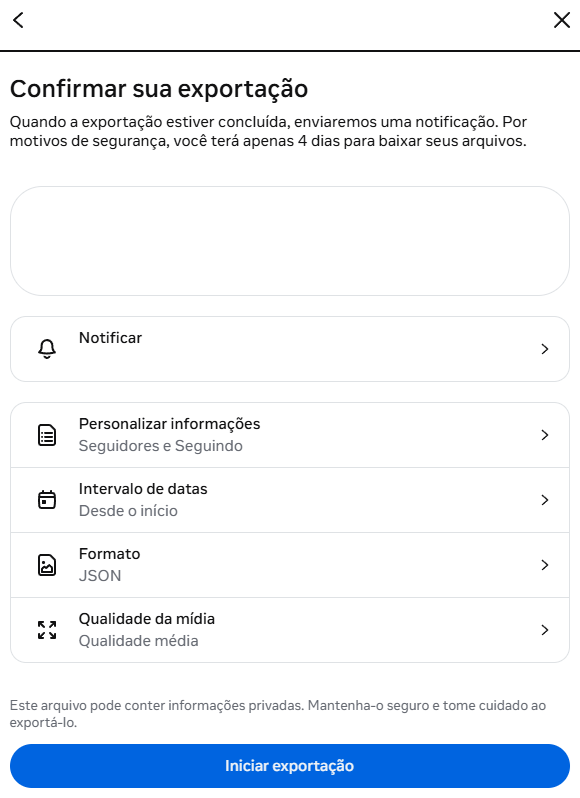
Set it up like this before exporting
Customize information: Followers and Following
Date range: All timeCRITICAL
Format: JSONREQUIRED
Warning: selecting a short date range or HTML format will result in an incorrect analysis
I have the files — analyze now
No login · No password · 100% local
How it works in 3 steps
01
Export your data
On Instagram, go to Accounts Center → Download your information. Select JSON and wait for the email.
Accounts Center → JSON
02
Receive the ZIP
Instagram will email you a .zip file. It can take minutes to 48 hours.
Email with .zip file
03
Upload here
Drag the ZIP directly or extract and upload the JSONs. Instant analysis on your device.
100% local · No login
5 minto set up
JSONrequired format
All timerequired range
Go directly to the export page
Opens Meta's Accounts Center